Thank you for your purchase!
Installation
Step 1: Upload Extension Files
Upload the RenewAhead extension files to your Paymenter installation:
/var/www/paymenter/extensions/Others/RenewAhead/
Upload all RenewAhead files to
extensions/Others/RenewAhead/
using SFTP or your preferred file transfer method.
Step 2: Enable Extension
Enable the extension in your Paymenter admin panel:
Admin Panel → Extensions → Others → RenewAhead → Enable
The extension runs its database migrations automatically when enabled, and again after an update.
Enabling it also creates three terms straight away: 3, 6 and 12 periods, all three without a discount. Adjust them under Terms and discounts below.
How it works
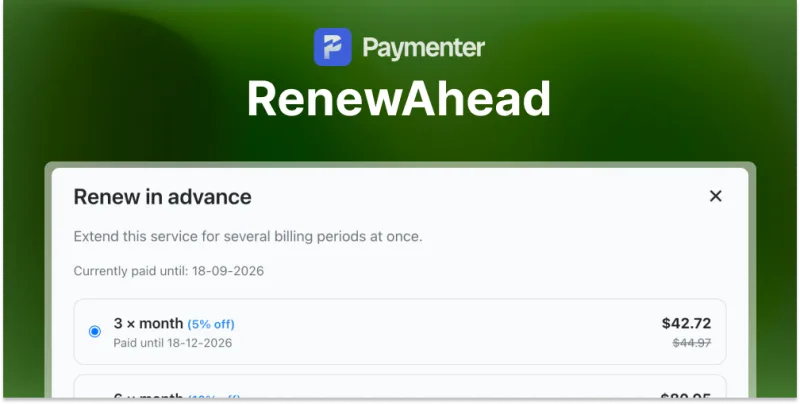
The customer picks a number of billing periods, sees the total and the new expiry date, and continues to the invoice. As soon as that invoice is paid, the expiry date moves forward by the chosen number of periods.
Periods follow the plan, not the calendar. The extension counts in the actual billing cycle of the plan. On a quarterly plan, 4 periods is a year, not four months.
While an invoice for the service is still open, a second renewal cannot be started. The customer has to pay or cancel the open invoice first.
Terms and discounts
Manage the terms at Admin Panel → RenewAhead → Terms & discounts . Each term has a number of periods, a discount percentage, a position in the list, and an on or off switch.
A common ladder looks like this:
| Periods | Discount |
|---|---|
| 3 | 5% |
| 6 | 10% |
| 12 | 15% |
Theme integration
This step is optional. Without it the extension still works through its own page at
/services/{id}/renew-ahead
. The integration only adds the button with the popup to the service page.
Edit
themes/default/views/services/show.blade.php
and make the two changes below.
Change 1: the button row condition
In an untouched
show.blade.php
(Paymenter 1.5.8, 150 lines), line 68 reads:
@if($service->cancellable || $service->upgradable || count($buttons) > 0)
Replace that one line with these three:
@php($canRenewAhead = view()->exists('renewahead::service-button')
&& \Paymenter\Extensions\Others\RenewAhead\Services\RenewAheadService::isEligible($service))
@if($service->cancellable || $service->upgradable || count($buttons) > 0 || $canRenewAhead)
Change 2: the button itself
Line 71 reads
<div class="mt-2 flex flex-row gap-2 flex-wrap">
. Add the block below directly after it, so it sits just before
@if($service->upgradable)
:
@if($canRenewAhead)
@include('renewahead::service-button')
@endif
Afterwards, clear the compiled views:
php artisan view:clear
Configuration
| Setting | Description | Default |
|---|---|---|
| Enable advance renewals | Turn the whole feature on or off | On |
| Allow on suspended services | A suspended service is extended from today, so the customer loses the remaining time | Off |
| Page title | Heading above the options | Renew in advance |
| Page intro | Line under the heading | Extend this service for several billing periods at once. |
| Note below the button | Small print under the button | The service is extended as soon as the invoice is paid. |
| Button label | Text on the confirm button | Continue to payment |
| Button label while working | Shown while the invoice is created | One moment... |
| Label: current expiry | Currently paid until | |
| Label: new expiry | Paid until | |
| Label: discount suffix | Word after the percentage | off |
| Label: go to invoice | Go to the invoice | |
| Error: open invoice | There is already an open invoice for this service. Please pay it first. | |
| Error: no term chosen | Please choose how long you want to renew for. |
Admin overview
Admin Panel → RenewAhead → Advance renewals lists every renewal with the customer, the service, the number of periods, the discount, the amount, the status, and the date the service is paid until.
After a Paymenter update
A Paymenter update overwrites
show.blade.php
and removes the two changes. Check with:
grep -c renewahead themes/default/views/services/show.blade.php
Zero means the changes have to be added again. The renewal page itself keeps working either way, only the button disappears.
Troubleshooting
| Symptom | Cause |
|---|---|
| No button on the service page | The theme integration is missing, or the service is not eligible |
| The button never appears for one service | Only active recurring services with a price above zero qualify. One-time and free plans are excluded |
| "There is already an open invoice" | The customer has an unpaid invoice for that service. It must be paid or cancelled first |
| The date moved by only one period | The extension is not enabled, so the paid invoice was handled by Paymenter alone |
Need Help?
Join our Discord Server and open a ticket for support.
© 2026 RenewAhead - BuiltByOtte . All rights reserved.