AlwaysMOTD Addon | Calagopus v1.0
Always-on MOTD: Instantly show if a server is offline, installing, starting, or suspended
Overview
When a Minecraft server goes offline, the server entry in a player's multiplayer list simply fails to respond. They see a connection error and no explanation, the same blank result whether the server is stopped, still installing, restarting, or suspended for non-payment.
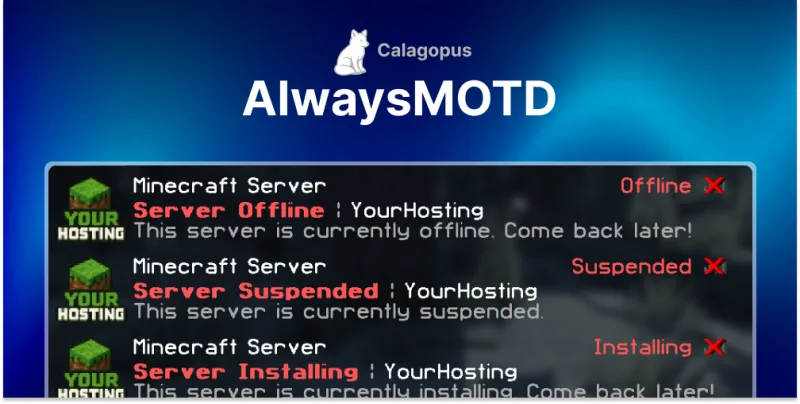
AlwaysMOTD answers those server-list pings even when the server itself is down, so the entry keeps showing a proper MOTD with your branding and the actual reason. Players see Server Offline, Server Suspended, or Server Installing with a message you control, instead of a dead entry.
What it does
- Answers pings while the server is down: the multiplayer list entry stays alive and readable instead of timing out.
- State-aware messaging: offline, installing, starting, and suspended each get their own message, so a suspended server does not look like a broken one.
- Your branding: set the hostname line and MOTD text so the entry still reads as your service.
- Fewer support tickets: "is my server broken?" is answered in the client, before the customer opens a ticket.
Who it is for
Minecraft hosts running Calagopus who do not want an offline or unpaid server to look like a fault. It matters most where players, not just the account holder, see the server in their list.
How it runs
AlwaysMOTD installs on your node rather than the panel: a small Node.js service, managed with PM2, that watches a configured port range and responds on behalf of servers that are not currently up. Full setup steps are in the AlwaysMOTD documentation.
Also available for Pterodactyl
Running the older panel, or migrating gradually? The same extension is available as AlwaysMOTD Addon for Pterodactyl. If you are weighing the two panels against each other, the Calagopus review covers the differences in detail.
Support
For questions before or after purchase, join the BuiltByOtte Discord.
Reviews
No reviews yet. Customers who bought AlwaysMOTD Addon | Calagopus can review it here after downloading it.