
Paymenter is excellent at handling billing, provisioning, and client management. SEO is not its strong suit. Out of the box, a Paymenter installation has no way to set custom meta descriptions per page, generates no XML sitemap, includes no Open Graph tags, and produces no structured data.
For hosting providers who rely on organic search to acquire customers, this is a real problem. Your pricing page, service pages, and any custom content all look the same to search engines, generic, unoptimised pages with no signals to rank.
This guide covers every SEO layer that matters for a Paymenter store, why each one affects rankings and click-through rates, and how to actually implement them.
Why SEO Matters for Hosting Businesses
Hosting is a high-intent search category. Someone searching "cheap game server hosting" or "Pterodactyl billing panel" is actively looking to buy or evaluate. Ranking for those terms drives qualified traffic, people with credit cards ready.
The challenge is that the Paymenter store itself is where conversions happen. If your store pages aren't indexed or rank with poor click-through rates, the traffic never arrives regardless of how good your pricing is.
What Paymenter Lacks by Default
Here's the full list of SEO features missing from a standard Paymenter installation:
- No custom meta titles per page: every page uses the same generic site name
- No meta descriptions: Google generates its own snippet, usually poorly
- No Open Graph tags: links shared on Discord, Twitter, or Slack show no preview
- No Twitter Card tags: same problem
- No XML sitemap: Google has to discover your pages on its own, which is slow and incomplete
- No canonical URLs: duplicate content issues if your pages are accessible via multiple paths
- No structured data: no chance of rich results (star ratings, FAQ snippets, etc.)
- No robots meta control: you can't tell Google to noindex specific pages like checkout or login
This is a lot to fix manually, especially since Paymenter's theme system isn't designed for easy per-page template changes.
Option 1: The Better SEO Addon (Recommended)
The Better SEO Addon for Paymenter by BuiltByOtte solves every item on the list above from the admin panel, no theme editing or code changes required.
What It Adds
- Per-page meta titles and descriptions: set a custom title and description for your homepage, service pages, and more. These appear in Google search results and affect both rankings and click-through rate.
- Open Graph tags: control how your pages appear when shared on Discord, Facebook, LinkedIn, and other platforms. Set a custom image, title, and description per page.
- Twitter Cards: same as Open Graph but for Twitter/X. Large image card format for maximum visibility.
- Canonical URLs: tell search engines the definitive URL for each page, preventing duplicate content issues.
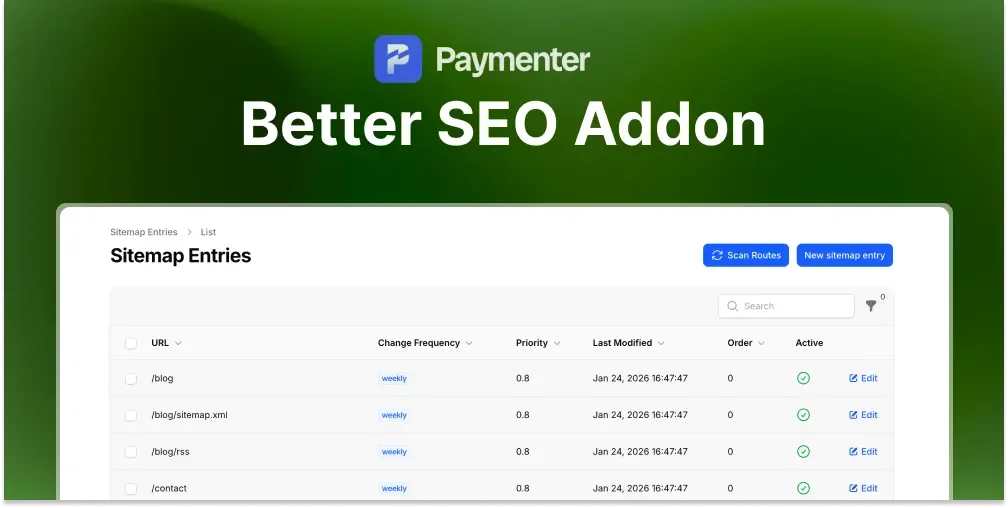
- XML sitemap generation: automatically generates and updates a sitemap that you can submit to Google Search Console. Includes all service pages and blog posts if you use the Blog Addon.
- Structured data (JSON-LD): adds schema markup that enables rich results in Google. Relevant for hosting providers: Organisation schema, WebSite schema, and product/service markup.
- Robots meta control: set pages to noindex (login, checkout, account pages) so they don't dilute your crawl budget.
Setup in the Admin Panel
After installing the addon, all settings appear in a dedicated SEO section of the Paymenter admin panel. For each page type you can configure:
- Title tag (with a character count guide for the 50–60 char sweet spot)
- Meta description (with a 150–160 char target)
- OG image URL and alt text
- Canonical URL override
- Index/noindex setting
The sitemap is generated automatically at /sitemap.xml and updates when you add or modify pages.
Full setup documentation is available at docs/seo.
Option 2: Manual Theme Edits
If you're comfortable editing Blade templates, you can add some SEO features manually. This approach works but has significant limitations:
- You can add global meta tags in the layout file, but per-page customisation requires passing data from each route
- Sitemap generation requires writing a controller and route
- Theme updates from Paymenter can overwrite your changes
- There's no UI, every change requires a code deployment
For most operators, the addon is a better trade-off at $4.99 versus the ongoing maintenance burden of custom theme SEO.
SEO Best Practices for Paymenter Pages
Once you have the technical infrastructure in place (meta tags, sitemap, structured data), the following practices determine how well your pages actually rank.
Homepage
Your homepage should clearly communicate:
- What type of hosting you offer (game servers, VPS, web hosting)
- Which control panels you use (Pterodactyl, Proxmox, etc.)
- Your location or target market if relevant
- A primary keyword in the H1 and title tag
Example title: "Affordable Game Server Hosting with Pterodactyl, [Your Brand]"
Service Pages
Each product or service category deserves a unique, descriptive title and meta description. Avoid generic names like "Plan 1" or "Basic", search engines and potential customers need to understand what's being offered.
Good: "Minecraft Server Hosting, Starting at $3/month"
Bad: "Game Servers"
Blog Content
If you're using the Blog Addon, blog posts are your main organic traffic driver. Write about topics your target customers search for:
- Setup guides for the games or software you host
- Comparisons of hosting options
- Tutorials for common tasks (installing mods, connecting to a server, etc.)
- Announcements that include keywords (new locations, new control panel versions)
Getting Indexed by Google
With a sitemap generated, the next step is submitting it to Google Search Console:
- Go to Google Search Console and add your domain
- Verify ownership via DNS record or HTML file
- Navigate to Sitemaps and submit
https://your-domain.com/sitemap.xml - Request indexing for your most important pages via the URL Inspection tool
New domains typically take 1–4 weeks to get meaningful coverage in search results. Established domains with incoming links index faster.
Tracking SEO Results
Google Search Console is the primary tool for monitoring your Paymenter store's search performance:
- Performance report: which queries send traffic, what pages rank, average position
- Coverage report: which pages are indexed and which have errors
- Core Web Vitals: page speed and user experience signals that affect rankings
Check it monthly at minimum. Indexed page count dropping is a warning sign. Impressions growing but click-through rate staying low means your title tags or descriptions need work.
Common SEO Mistakes on Paymenter Stores
- Leaving the default title on every page. If all your pages show the same title in Google results, click-through rates will be terrible. Every page needs a unique, descriptive title.
- No sitemap submitted. Google will eventually find your pages through crawling, but submitting a sitemap significantly speeds up the process.
- Indexing login and checkout pages. These pages waste crawl budget and add no SEO value. Set them to noindex.
-
Using client-panel subdomains. If your billing panel is at
billing.yourdomain.com, it's a separate domain for SEO purposes. Consider the impact on authority distribution. - No internal links between pages. Link from your homepage to service categories, from blog posts to relevant service pages, and from the help center to related services.
Conclusion
Paymenter is a solid billing platform with a clear SEO blind spot. The gap between what a hosting business needs for organic search and what stock Paymenter provides is large, but it's solvable.
The fastest path is the Better SEO Addon, which handles every missing technical layer from the admin panel without requiring theme edits. Once the infrastructure is in place, the focus shifts to content: unique titles and descriptions on every page, a sitemap submitted to Google, and blog content that targets the searches your potential customers are already making.
Looking for a broader overview of Paymenter? Read our guide on Paymenter as a free WHMCS alternative, or explore our full list of best Paymenter extensions to see what else you can add.
Frequently Asked Questions
Does Paymenter have built-in SEO features?
No. Stock Paymenter has no meta description control, no Open Graph tags, no XML sitemap, and no structured data. An extension or custom theme edits are required.
Does Paymenter generate a sitemap?
Not by default. The Better SEO Addon adds automatic XML sitemap generation at /sitemap.xml.
Can I rank a Paymenter store on Google?
Yes. With proper meta tags, a sitemap, and structured data, Paymenter pages rank in Google like any other website. The Better SEO Addon provides all of this.
How do I submit my Paymenter site to Google?
Generate a sitemap, then submit it to Google Search Console under the Sitemaps section. Also use the URL Inspection tool to request indexing for your key pages.
What is the Better SEO Addon for Paymenter?
A Paymenter extension by BuiltByOtte that adds per-page meta titles, meta descriptions, Open Graph, Twitter Cards, canonical URLs, XML sitemap generation, and structured data, all from the admin panel.
 Better SEO Addon | Paymenter
 Helpcenter/KnowledgeBase | Paymenter
 Statuspage Addon | Paymenter